XFS
Prerequisites
- The selected storage path must be on an XFS file system.
- For basic file system setup on the Node, refer to the File System section.
Creating a Synthetic Filesystem Backup Destination
- Select File System from Backup Destinations.

- Select Create Backup Destination -> File System (Synthetic).
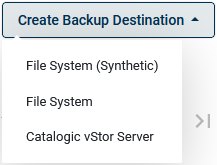
- In the configuration screen:
- The setup process is similar to a regular File System configuration.
- For the Storage Backend, select XFS.
- When setting the path, ensure it is located on an XFS file system.