Backup Destinations
A backup destination is a storage location where DPX vPlus keeps VMs, Containers, Cloud, and applications backup copies. To configure a backup destination, you can use the following storage types:
The backup destination is defined by the backup provider configuration and retention settings. Each policy can be backed up to the selected backup destination. Backup destinations must be assigned to the nodes in the node configuration.
info
Note: removal of any backup destination leaves data in the backup provider without an option to re-attach it in the future.
Retention
info
Note: Retention settings are described in chapter Backup SLAs - Policy - Rule
Pre/post access command execution
- Prepare your scripts
- the pre-script is invoked before every access to the Backup Destination - common usage - create and mount the remote volume
- the post-script is executed after Node finishes store, restore, and clean-up operations
- The following environment variables are set before each execution - you can use them later in your scripts:
VP_VM_GUID- GUID of the VM in DPX vPlusVP_VM_UUID- UUID of the VM used by the hypervisor or hypervisor managerVP_VM_NAME- the name of the VMVP_VM_TMP_DIR- path to the folder containing files in the stagingVP_BD_GUID- GUID of the Backup Destination being accessedVP_BD_NAME- the name of the Backup Destination being accessedVP_CONTAINER_NAME- standard container name generated by DPX vPlus that can be used for names of the volumes (format<VM-NAME>__<PART-OF-UUID>, for exampleCentos 7__8d3ef6f1, may contain special characters)VP_EXPORT_PATH- an export path from Node Configuration, can be used as the mount root for backup destination volumesVP_TASK_TYPE- the name of the task type, e.g.:STORE/RESTORE/DELETE_VM/OLD_BACKUPS_REMOVAL- to distinguish operation type when scripts are being invoked
- Upload your scripts to the node, where the
vprotectuser is able to access them - Optionally, you may need to add a new file in the
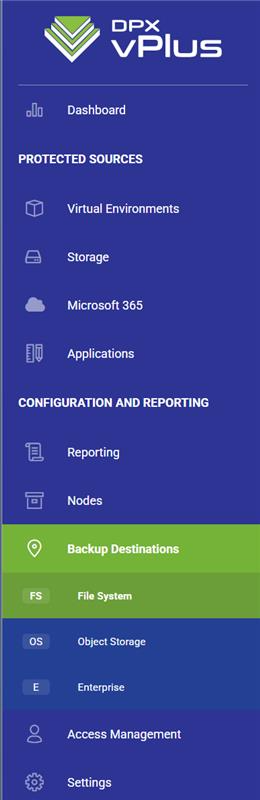
/etc/sudoers.d/directory to enable thevprotectuser to execute privileged script (like chown operations in some file system locations):%vprotect ALL=(root) NOPASSWD: /opt/vprotect/scripts/myscripts/privileged.sh - Open the "BACKUP DESTINATIONS" section from the left menu:
- Open your Backup Destination (click on the name)
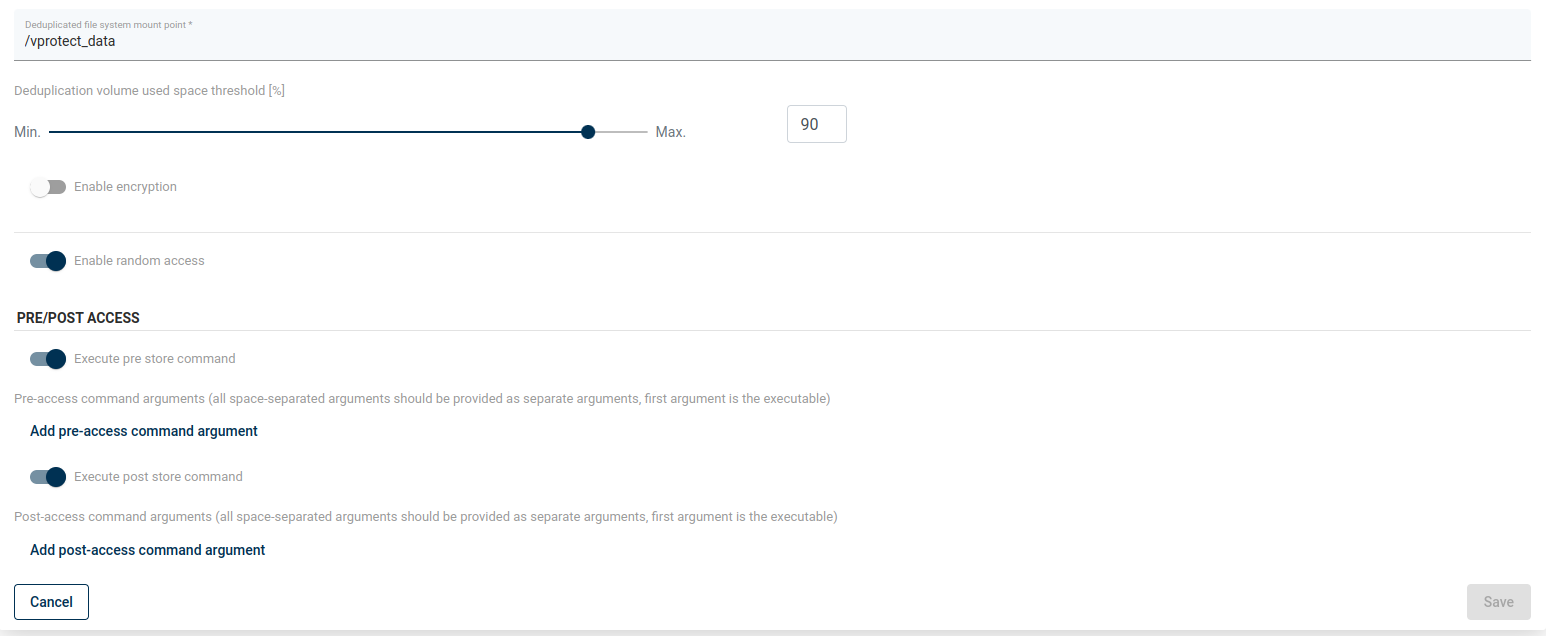
- Provide pre/post access command arguments (the first argument is the command executed locally on the node):
Encryption
| Backup Destination Name | Encryption supported? | Encrypted by | Encryption key stored in | Encryption key generation method | Encryption Algorithm |
|---|---|---|---|---|---|
| Filesystem | Yes | vPlus Node | Generated based on metadata in the database. Separated keys are generated per object. | automatically | AES |
| Filesystem (synthetic, XFS) | No | n/a | n/a | n/a | n/a |
| isoLayer (synthetic, XFS) | n/a | n/a | n/a | n/a | n/a |
| PowerProtect DD | Yes | vPlus Node | Generated based on metadata in the database. Separated keys are generated per object. | automatically | AES |
| Huawei OceanProtect | Yes | vPlus Node | Generated based on metadata in the database. Separated keys are generated per object. | automatically | AES |
| MS Azure Blob Storage | Yes | vPlus Node | Generated based on metadata in the database. Separated keys are generated per object. | automatically | AES |
| Amazon S3 | Yes | Server Side (Backup Destination own mechanism, not managed by vPlus) | Generated based on metadata in the database. Separated keys are generated per object. | automatically | n/a |
| S3 compatible | Yes | Server Side (Backup Destination own mechanism, not managed by vPlus) | Generated based on metadata in the database. Separated keys are generated per object. | automatically | n/a |
| Cloudian S3 | Yes | Server Side (Backup Destination own mechanism, not managed by vPlus) | Generated based on metadata in the database. Separated keys are generated per object. | automatically | n/a |
| Alibaba Cloud OSS | Yes | Server Side (Backup Destination own mechanism, not managed by vPlus) | Generated based on metadata in the database. Separated keys are generated per object. | automatically | n/a |
| Nutanix Objects | Yes | Server Side (Backup Destination own mechanism, not managed by vPlus) | Generated based on metadata in the database. Separated keys are generated per object. | automatically | n/a |
| OpenStack Swift | Yes | Server Side (Backup Destination own mechanism, not managed by vPlus) | Generated based on metadata in the database. Separated keys are generated per object. | automatically | n/a |
| Scality Ring | Yes | Server Side (Backup Destination own mechanism, not managed by vPlus) | Generated based on metadata in the database. Separated keys are generated per object. | automatically | n/a |
| Dell EMC Avamar | Provider dependent | n/a | n/a | n/a | n/a |
| Dell EMC Networker | Provider dependent | n/a | n/a | n/a | n/a |
| IBM Spectrum Protect | Provider dependent | n/a | n/a | n/a | n/a |
| Veritas Netbackup | Provider dependent | n/a | n/a | n/a | n/a |
| Micro Focus Data Protector | Provider dependent | n/a | n/a | n/a | n/a |